Firefox Versioning is Out of Hand

I’m a Firefox user since the 1.0 days. I did my part for the GetFirefox.com campaign when working at Emerson College helpdesk and getting people away from IE 6.

Since then I have moved on to Chrome as my primary browser, but I still use Firefox for the Something Awful forums extension, various HTML developer extensions, and my Ümloud! logins (preventing acidental personal posts). I also started using 1Password (a future post!) for better security across all my browsers. The key component to my Firefox use are the extensions (also known as Add-ons).

When Firefox first rolled out extensions, the API asked developers to limit what version the extension would work for. An extension for Firefox 3 wouldn’t work on 4. This forced developers to test the new browser and for users to update when needed. That way extensions wouldn’t soft-fail on users, causing them to think the browser is broken when the fault was the extension. This process was fine when major Firefox releases were around a year or more.

Recently Firefox started going on a version number release schedule similar to Chrome: Release early and very often. Major version number updates occur in a span of months or weeks. This is fine, but flies against extensions. An extension that got updated for the shipping version won’t work on a beta. The updating messages aren’t removable; just “ask later”. Now I have to pick between seeing update messages every time I launch, or break extension support.

So we need two things to happen here:

  • Make a third “wait till it’s released, not beta” option.
  • Extensions move away from version numbers and more to capability testing.

While the “not beta” option should be there in any case, we’re starting to see a change that the old versioning system isn’t paired with the change of development schedule. Without knowing too much about the extension system, I can’t help but think of the disastrous history of using User Agent strings to assume capabilities. The better approach is using something like Modernizr1 which tests what a browser can do, rather than the name/version of a browser. That way when a browser with a different name, but capable of the require actions, can still work. Past, present, and future.

Sadly, I can’t wait for these things to happen. Which sadly means on my Mac, I’ll be using Safari as my Ümloud! browser and only venturing into Firefox when I absolutely need to use an extension, assuming it still works…

1 Shout out to Faruk Ateş!

My Expanding Battery

This is a little PSA for any laptop battery. I happen to use a Mac Book Pro, but it’s an issue that can apply to any device.

For the past few weeks, I’ve noticed my trackpad was super sensitive to clicks. I haven’t notied it that much, but the bulk of my laptop use in the past three months is via Synergy and not using the trackpad. Now that Puzzle Agent 2 shipped, I’m back to working at my coffee shops. Today the clicking got so horrible I couldn’t do anything and had to shut down the computer.

Flipping it over to the back, the hood was bent out of shape a bit. I noticed this before, but I thought it was just use. Popping the hood, I remove the battery and see what’s under it. Didn’t see anything out of place, so I thought I’d see if there’s something wrong with the lid. Putting the lid back but without the battery, the lid clicked in place normally.

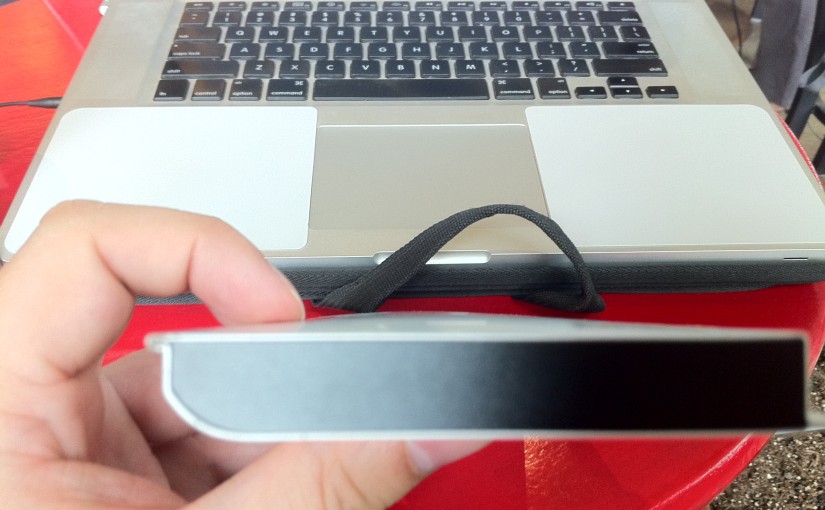
Looking at the battery, the “bottom” side which should be flat was bowing out:

Expanding Laptop battery


Keeping the battery out, I started my computer up again and things were working fine. Who knows what would have happened if I didn’t look at that sooner…

No more battery power, but I can click again! The Internet says it’s covered by Apple Care, which I have till Nov. Figuring out when I can make an Apple Store appointment.